
Contextli vs Wispr Flow
Contextli offers an on-device, offline mode on Pro and Pro Plus, and ships 18 built-in contexts plus your own, ready to paste into any app.
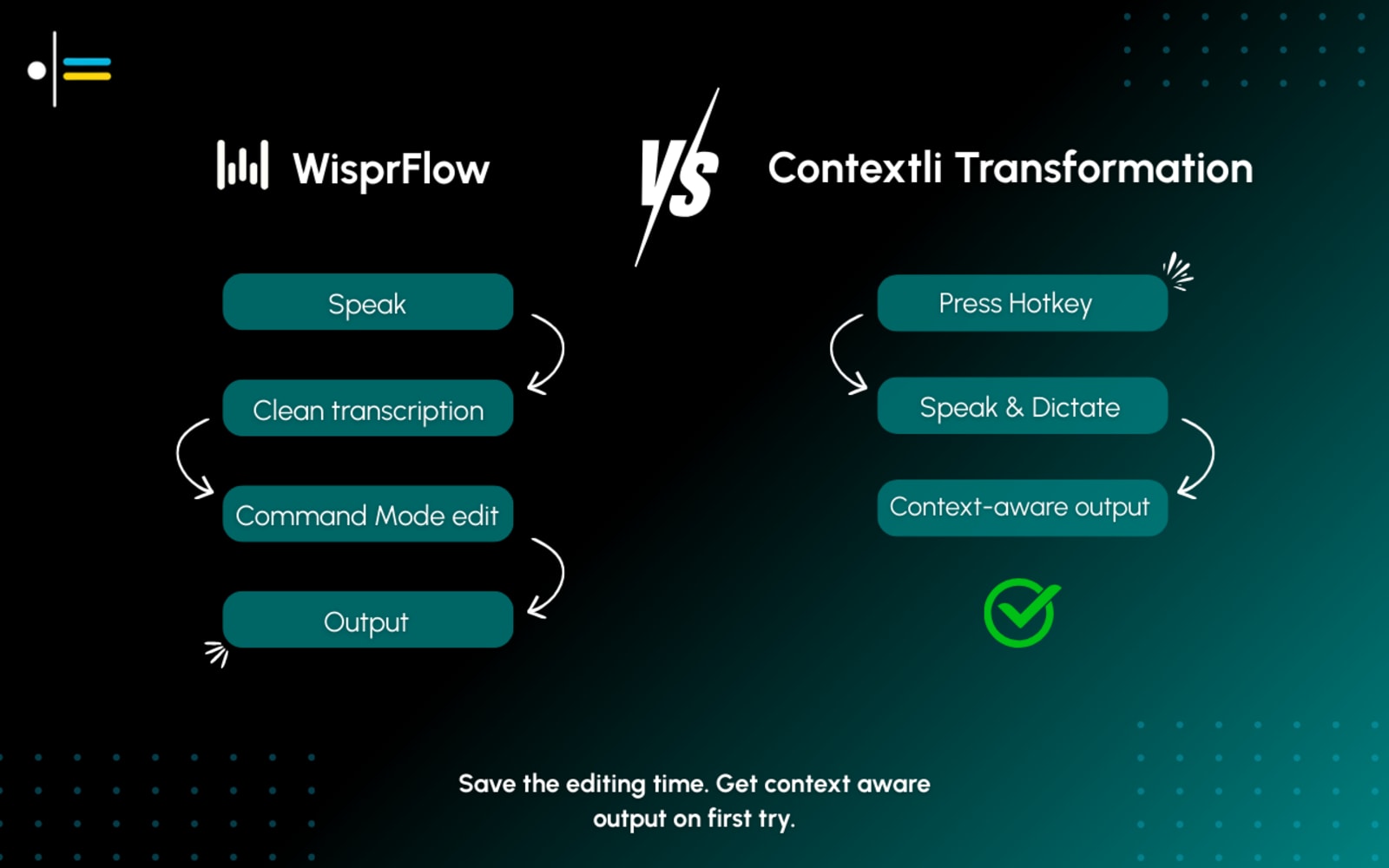
Why people look for a Wispr Flow alternative
Everything is processed in the cloud
Wispr Flow routes your audio to its servers every time you dictate. There is no offline mode, and your voice data leaves your device on every keystroke.
No pre-built app mode library
Wispr Flow reformats speech, but has no dedicated context library. There is no 'Technical: Bug Report' or 'Executive: Meeting Notes' context to activate in one click.
No Android app
Wispr Flow supports macOS, Windows, and iPhone, but not Android. Contextli has apps for all four: Mac, Windows, iPhone and Android.
Free tier is very limited
Wispr Flow's free plan is heavily restricted. Meaningful use requires Pro at $12/mo (annual) or $15/mo monthly.
Contextli vs Wispr Flow - the full picture
Contextli is a Wispr Flow alternative for people who want a choice about where their dictation is processed: it offers an on-device, offline mode on Pro and Pro Plus, works in any app with 18 built-in contexts plus your own, and starts with a 7-day free trial, while Wispr Flow processes every word in the cloud. Wispr Flow is a popular AI dictation tool that auto-edits your speech, trimming filler words and adjusting tone per app, and it now runs on macOS, Windows, and iPhone, but everything is processed in the cloud. Contextli processes in the cloud by default too, with an on-device, offline option on Pro and Pro Plus, and ships 18 built-in contexts plus your own that you pick from the Context Bar or a hotkey. If privacy, an offline option, or ready-made contexts matter to you, Contextli is worth comparing.
What is Wispr Flow? Contextli is a Wispr Flow alternative for people who want a choice about where their dictation is processed: it offers an on-device, offline mode on Pro and Pro Plus, works in any app with 18 built-in contexts plus your own, and starts with a 7-day free trial, while Wispr Flow processes every word in the cloud. Visit wisprflow.ai for their full story.
Contextli vs Wispr Flow
| Feature | Contextli | Wispr Flow |
|---|---|---|
| Platform | macOS, Windows, iPhone, Android | macOS, Windows, iPhone (Android beta) |
| Processing | Cloud (on-device on Pro/Pro Plus) | Cloud-only |
| Pre-built modes | 18 built-in contexts + your own | None - auto tone adjustment only |
| Offline support | Pro and Pro Plus | No |
| Free to try | 7-day free trial on every plan | Limited free tier |
Contextli vs Wispr Flow
A clear, honest feature comparison.
| Feature | ContextliOur pick | Wispr Flow |
|---|---|---|
| Platform support | YesmacOS, Windows, iPhone, Android | YesmacOS, Windows, iPhone (Android in beta) |
| Per-app formatting | YesYou pick the context, from the Context Bar or its own hotkey | PartialAuto-edits and adjusts tone, but no pre-built app-mode library |
| Processing & privacy | YesCloud by default; on-device mode on Pro and Pro Plus | NoCloud-based - audio sent to Wispr servers |
| What happens to your voice data | YesCloud by default; on-device or your own API key on Pro and Pro Plus, so it never has to leave your computer. | NoProcessed in the cloud on Wispr's servers as part of normal operation. |
| Offline support | YesOn Pro and Pro Plus, using the on-device mode | NoNo - requires an internet connection |
| Pre-built modes | Yes18 built-in contexts plus your own (Technical: Bug Report, Sales: CRM Notes, and more) | PartialCommand Mode + snippets, no app-mode library |
| Pricing | YesFrom $45/yr or $9/mo (Starter). 7-day free trial. | YesFree tier; Pro $12/mo annual ($15 monthly) |
Platform support
Contextli
YesmacOS, Windows, iPhone, Android
Wispr Flow
YesmacOS, Windows, iPhone (Android in beta)
Per-app formatting
Contextli
YesYou pick the context, from the Context Bar or its own hotkey
Wispr Flow
PartialAuto-edits and adjusts tone, but no pre-built app-mode library
Processing & privacy
Contextli
YesCloud by default; on-device mode on Pro and Pro Plus
Wispr Flow
NoCloud-based - audio sent to Wispr servers
What happens to your voice data
Contextli
YesCloud by default; on-device or your own API key on Pro and Pro Plus, so it never has to leave your computer.
Wispr Flow
NoProcessed in the cloud on Wispr's servers as part of normal operation.
Offline support
Contextli
YesOn Pro and Pro Plus, using the on-device mode
Wispr Flow
NoNo - requires an internet connection
Pre-built modes
Contextli
Yes18 built-in contexts plus your own (Technical: Bug Report, Sales: CRM Notes, and more)
Wispr Flow
PartialCommand Mode + snippets, no app-mode library
Pricing
Contextli
YesFrom $45/yr or $9/mo (Starter). 7-day free trial.
Wispr Flow
YesFree tier; Pro $12/mo annual ($15 monthly)
What actually makes the difference
A closer look at where Contextli and Wispr Flow diverge.
Your voice can stay on your device (Pro and Pro Plus)
Cloud is the default, but on Pro and Pro Plus you can switch to an on-device mode: nothing is sent to a server, not to Contextli, not anywhere. Wispr Flow is cloud-based only: every recording is sent to its infrastructure and processed remotely. If your internet goes out, so does Wispr Flow.
18 built-in contexts vs. free-form reformatting
Contextli ships 18 built-in contexts, plus your own, covering things like a bug report, a Slack message, and a professional email. You pick the context that matches what you're writing, from the Context Bar or its own hotkey. Wispr Flow can adjust tone and trim filler words, but there is no context library to choose from, you get what it infers.
Broader platform coverage
Contextli runs on macOS, Windows, iPhone and Android. Wispr Flow covers macOS, Windows, and iPhone, with Android in early beta. If you need a reliable Android app today, Contextli is the safer bet of the two.
Offline dictation: how do they compare?
Wispr Flow requires an active internet connection for every session. Contextli on Pro and Pro Plus can run an on-device model that lets you dictate with zero internet, on flights, in secure environments, or anywhere cloud access is unavailable or unwanted.
Raw voice → structured, app-ready output
See how Contextli formats speech automatically for Wispr Flow's typical workflow, and beyond it.
Watch Contextli in action
Pick the Slack context once, and Contextli pastes a trimmed, conversational message shaped for Slack, on-device on Pro and Pro Plus with no cloud round-trip.
Where Wispr Flow is genuinely strong
We believe in honest comparisons. Here is where the competition has real strengths.
When Wispr Flow is still the better fit
Wispr Flow is a good choice if you are on macOS or iPhone, want a polished cloud-powered dictation experience, and prioritise strong raw transcription accuracy over on-device privacy. Its brand recognition and user community are genuine advantages if peer-tested tools matter to you.
Why Contextli?
Wispr Flow is a polished, accurate dictation tool, but it only runs in the cloud, with no offline mode, and it doesn't ship a library of ready-made contexts. Contextli processes in the cloud by default too, with an on-device, offline mode on Pro and Pro Plus, and gives you 18 built-in contexts plus your own that you pick per app: a structured Jira-style ticket, a casual Slack message, a proper email greeting. You also get iPhone and Android apps alongside Mac and Windows.
On-device privacy
Your voice stays on your computer. No cloud, no data sharing, and it works offline too.
25+ automatic modes
Pre-built app modes format your speech for Jira, Slack, Gmail, and more - no configuration required.
Every platform
Mac, Windows, Linux, iOS, and Android - the broadest cross-platform coverage in voice dictation.
Pricing
From $45/yr
7-day free trial on every plan. Starter is $45/yr or $9/mo. A limited-time lifetime plan is also available if you would rather pay once.
from $12/mo
Pro at $12/mo billed annually ($15/mo monthly) - about $144 at one year on the annual plan. Limited free tier.
The honest take
Both tools format your voice for the app you are in. The real fork is cloud vs. on-device. If privacy, offline use, or a ready-made app-mode library matter, Contextli wins on all three. If you want a polished cloud-based experience on macOS or iPhone and do not mind sending audio off-device, Wispr Flow is solid.
18 built-in contexts + your own, on-device/offline mode (Pro+), 7-day free trial
Polished cloud experience, strong brand, macOS + Windows + iPhone
Contextli vs Wispr Flow - who should use which
- Contextli: privacy-first users who want an on-device option, Windows and Android users, and teams wanting ready-made contexts for each app
- Wispr Flow: macOS and iPhone users who want a polished cloud-powered experience and are comfortable sending audio off-device
Frequently asked questions
Loved by people who talk faster than they type
Try Contextli free for 7 days
See how context-aware voice dictation compares in your own workflow.
7-day free trial. Cancel anytime. Start dictating in minutes.