
A mouse button
Click a spare button to start. Click it again to stop.
- You need
- A mouse with an extra button and its app, such as Logi Options+.
- Best for
- Writing all day at your desk.
For hands-free dictation on a Mac, map a spare mouse button to Contextli and dictation starts and stops with a single click. Or turn on Siri Dictation and start it by saying “Dictate with Contextli”. Your words land where your cursor is, and Contextli can press Enter for you.
 By Junaid Khalid · Updated
 To dictate hands-free on a Mac, give dictation a trigger you can reach without the keyboard. In Contextli, set Recording Mode to Toggle Recording and set the shortcut to a key you never type, such as Page Down. Then map a spare mouse button to that key in your mouse app. Click once to start, talk, click again to stop.
For no hands at all, turn on Siri Dictation in Contextli and say “Dictate with Contextli”. Turn on Press Enter After Paste and chat messages send themselves.
“With Dictation, you can speak to enter text anywhere you can type it.”
Apple Support, Dictate messages and documents on Mac
Apple Dictation starts from the Microphone key, a keyboard shortcut or the Edit menu. Contextli adds a trigger you can map to a mouse button, Siri phrases, automatic Enter, and contexts that format your words.
There are 3 hands-free triggers on a Mac: a spare mouse button, a Siri phrase, or a tap on a Magic Mouse or trackpad. Each one fires the same Contextli recording, so you can mix them through the day.
Click a spare button to start. Click it again to stop.
Say “Dictate with Contextli” and start talking.
Tap or swipe on a Magic Mouse or trackpad.
| Method | Start and stop | You need | Hands used |
|---|---|---|---|
| Mouse button | One click to start, one to stop | A mouse with a spare button and its app | One finger |
| Siri phrase | “Dictate with Contextli”, said again to stop | Siri on in macOS, Siri Dictation on in Contextli | None |
| Gesture | A tap or swipe you choose | BetterTouchTool and a Magic Mouse or trackpad | One or two fingers |
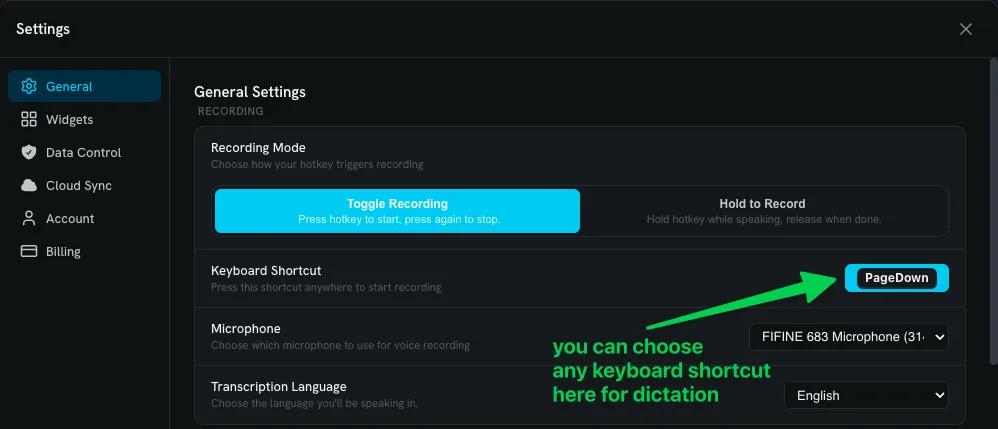
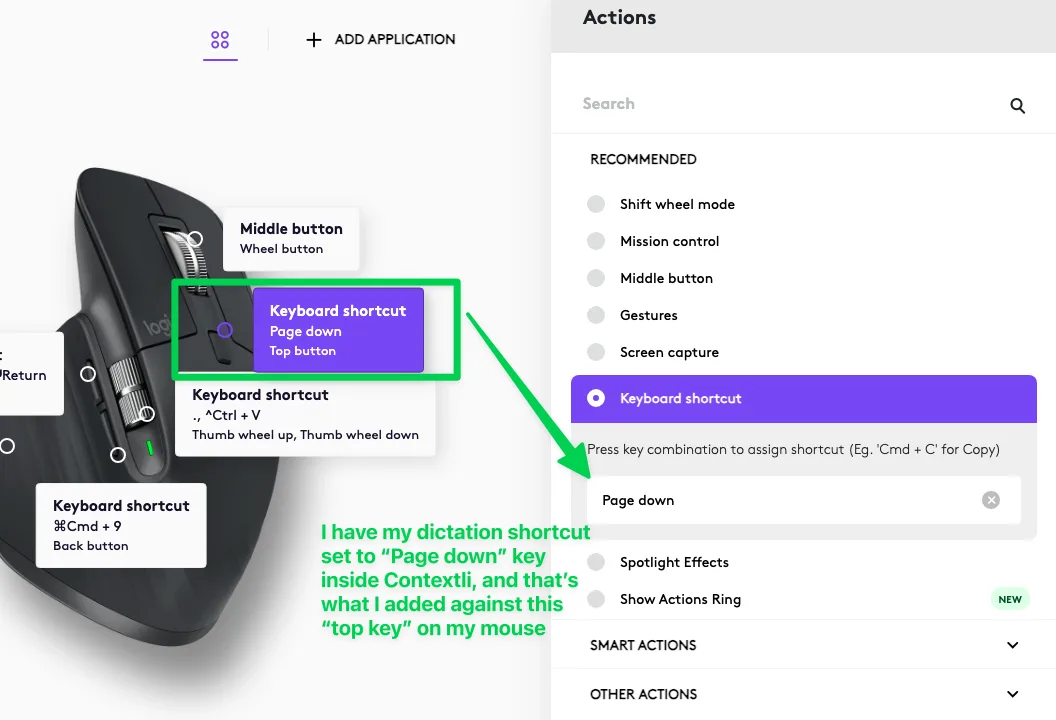
Set Contextli to Toggle Recording, give it a shortcut you never type, and make a spare mouse button send that key. It takes 4 steps. The screenshots are the setup we use every day: Contextli's shortcut set to Page Down, and the top button of a Logitech MX mouse sending Page Down.
In Contextli, open Settings › General. Under Recording Mode, choose Toggle Recording, so one press starts and the next press stops. Then click Keyboard Shortcut and press the key you want.
The default is Option+Space. A key you never use for typing, like Page Down, is easiest to hand to a mouse button.
Open your mouse's app, pick a spare button, choose the Keyboard shortcut action and press the same key you set in Contextli. In Logi Options+ that is Actions › Keyboard shortcut.
Most gaming and productivity mice have an app like these with the same kind of setting.
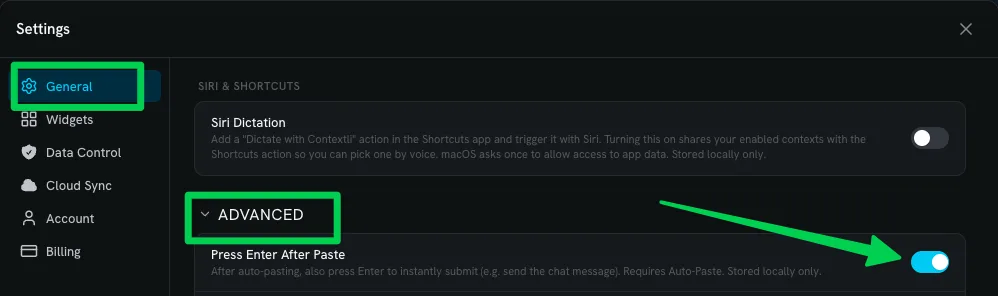
Auto-Paste is on by default, so your text goes straight into the app you are in. For chat apps, open Settings › General › Advanced and turn on Press Enter After Paste. Contextli presses Enter after pasting, so the message sends itself.
It is off by default, because in a document you usually want to keep writing on the same line.
Click into any text box, click your mouse button, say a sentence and click again. The text appears at your cursor, formatted by the context you are using.
Each context in Contextli can have its own hotkey. Map one mouse button to your everyday context and another to Email, and the button you click decides how the text is formatted.
Turn on Siri Dictation in Contextli, then say “Dictate with Contextli”. Contextli adds a Dictate action to Siri and the Shortcuts app with 4 built-in phrases. It starts recording in the background, so your words are typed into the app you are already in.
In Contextli, open Settings › General › Siri & Shortcuts and turn on Siri Dictation. This shares your enabled contexts with the Shortcuts action, so you can pick one by voice. It is stored on your Mac only.
Siri itself needs to be on in macOS. Apple shows how in Turn on and activate Siri.
The first time, macOS asks to allow access to app data. Allow it. You can see it later in System Settings › Privacy & Security › Files & Folders, under Contextli.
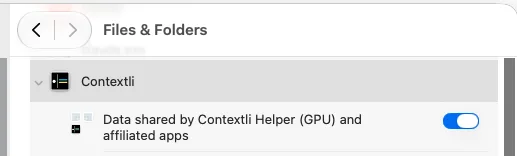
Any of these work with no setup in the Shortcuts app. Contextli starts recording without opening its window. Say the phrase again, or press your shortcut or mouse button, to stop.
Open the Shortcuts app, search for Contextli and add the Dictate action. Pick a context, such as Email, and name the shortcut, for example “Email dictation”. Saying that name to Siri dictates straight into the Email context. Duplicate it for every context you use.
Keep Contextli in your Applications folder so the Shortcuts app can find its action.
Apple's Magic Mouse has no extra buttons. BetterTouchTool can map a tap or swipe on a Magic Mouse or trackpad to a keyboard shortcut.
Pick a gesture you will not trigger by accident, set its action to your Contextli shortcut, and it starts and stops dictation the same way a mouse button does.
Yes. Contextli also runs on iPhone and Android, so you can capture voice notes when you are not at your desk. Loop Engineering shows how to have an AI agent on your computer act on those notes while you are away.
For Apple Dictation, press the Microphone key in the row of function keys if your Mac has one, use the Dictation keyboard shortcut set in System Settings > Keyboard, or choose Edit > Start Dictation. Contextli uses its own shortcut, Option+Space by default, and you can change it to any key, including one you then map to a mouse button.
Yes. Set Contextli to Toggle Recording, set its keyboard shortcut to a key you never type, such as Page Down, then use your mouse software (Logi Options+, Razer Synapse, Corsair iCUE or SteelSeries GG) to make a spare button send that key. One click starts dictation and the next click stops it.
Yes, with Contextli. Turn on Siri Dictation in Contextli under Settings > General > Siri & Shortcuts, allow access once when macOS asks, then say "Dictate with Contextli". Contextli starts recording in the background and types into the app you are already using. Say it again, or press your shortcut, to stop.
Turn on Press Enter After Paste in Contextli under Settings > General > Advanced. After Contextli pastes your text, it presses Enter, so a chat message sends without a keystroke. It needs Auto-Paste, which is on by default.
A Magic Mouse has no spare buttons, so use BetterTouchTool to map a tap or swipe on the Magic Mouse or trackpad to your Contextli shortcut. The gesture then starts and stops dictation like a button.
Yes. Apple Dictation is built into macOS: turn it on in System Settings > Keyboard > Dictation. It types your words as you say them. Contextli adds a shortcut you choose, Siri phrases, automatic Enter, and contexts that format the same words for Slack, email or a bug report.
No. Voice Control lets you enter text and control your whole Mac by speaking commands instead of using a keyboard, mouse or trackpad. Apple notes: "When Voice Control is on, you use Voice Control to dictate text; standard macOS Dictation isn’t available." Dictation, and Contextli, are for turning speech into text in the app you are using.
No. The Dictate action runs without bringing Contextli to the front, so your words are typed into whatever app and text field you were already in.
Contextli runs on Mac, Windows, iPhone and Android.