
Last updated 30 September 2026
Voice to text for Windows: 10 tools compared
Voice to text for Windows is already on your PC: press Win+H in any text box and start talking. Whether you need anything more comes down to two things, whether you work offline, and how much fixing you are willing to do after you speak. This guide compares the two free tools built into Windows with eight other options, and says plainly when the free one is enough.
Pick the row that matches your hardest requirement.
- Free and already installed: Windows voice typing. Press Win+H. Good for short messages, but it needs internet.
- Free and offline: Voice access in Windows 11. It types and controls your PC by voice once its language files are downloaded.
- Free, offline, not from Microsoft: Handy, an open-source app that runs speech recognition on your own computer.
- Cleaned-up text in any app: Wispr Flow, SuperWhisper or Contextli. Contextli is the one that rewrites for the app you are in and has an on-device mode.
- Heavy specialist dictation: Dragon Professional, the long-running installed option with a one-time licence.
Voice typing vs voice access: the two free tools
Windows ships two different speech features, and most guides blur them. Here is what each one does.
Voice typing (Win+H)
Press Win+H with your cursor in any text box. A small toolbar appears and types what you say. It works on Windows 10 and 11, covers more than 40 languages and has an automatic punctuation setting.
It needs an internet connection every time. On Copilot+ PCs, a newer setting called fluid dictation also fixes grammar, punctuation and filler words as you speak, in English.
Microsoft's voice typing guideVoice access (Windows 11)
Built for running the whole PC by voice: opening apps, clicking, scrolling and writing. It is available on Windows 11 version 22H2 and later, and in September 2024 it replaced the older Windows Speech Recognition.
After a one-time download of language files, it runs on your device with no internet. It supports far fewer languages than voice typing, so check that yours is on Microsoft's list before you rely on it.
Microsoft's voice access setup guideIf you only want to type with your voice, start with Win+H. If you are often offline, or you want to use the PC without your hands, turn on voice access. On Windows 10 you have Win+H only: voice access and fluid dictation are Windows 11 features.
How to turn on voice to text in Windows
- 1
Put your cursor in a text box
Click into anything that accepts typing: an email, a document, a chat box or a browser search bar.
- 2
Press Win+H
The voice typing toolbar opens and starts listening. On a touch keyboard, tap the microphone key instead.
- 3
Turn on automatic punctuation
Open the settings from the voice typing toolbar and switch on automatic punctuation, so you do not have to say "comma" and "period".
- 4
Speak, then say "stop listening"
Talk normally. Say "stop listening" or press Win+H again when you are done.
- 5
For offline use, set up voice access
Go to Settings, Accessibility, Speech and turn on voice access. Pick your language and let Windows download the speech files while you are online.
Voice typing commands worth learning
- Say "comma", "period" or "question mark" to add punctuation yourself.
- Say "delete that" or "scratch that" to remove what you just said, and "undo that" to bring it back.
- Say "select that" to highlight the last thing you said.
- Say "press Enter", "backspace" or "tab" to press those keys.
- Say "stop listening" to close the toolbar.
- Press Windows key + Spacebar to switch the voice typing language, the same way you switch keyboard layouts.
The limits of Windows voice typing
Win+H gets you dictating in seconds. The problems appear when you use it for real work.
Needs internet every time
Microsoft's help page lists an internet connection as a requirement for voice typing. On a plane or a patchy connection, Win+H stops working. Voice access is the built-in exception.
Punctuation is hit and miss
Automatic punctuation is an on/off setting. People in a Reddit thread about replacing voice typing still describe saying "full stop" several times, and the first word sometimes appearing twice.
Same output in every app
A Slack reply and a client email come out in the same raw style. Fluid dictation on Copilot+ PCs tidies grammar and filler words, but nothing changes tone per app.
Only on this PC
Voice typing does not follow you to a Mac or a phone. If you switch devices during the day, you learn a different tool on each one.
Best voice to text software for Windows at a glance
Prices are each vendor's published figures, checked on 24 September 2026. They change often, so confirm on the vendor's site before you buy.
| Tool | Cost | Works offline | Where it types | Best for |
|---|---|---|---|---|
| Windows voice typing | Free, built in | No | Any text box | Short messages when you are online |
| Windows voice access | Free, Windows 11 | Yes, after setup | Any app, plus full voice control | Offline dictation and hands-free use |
| Microsoft Word Dictate | With Microsoft 365 | No | Microsoft 365 apps only | Long documents you already write in Word |
| Google Docs voice typing | Free | No | Google Docs and Slides only | Drafting straight into Docs |
| Handy | Free, open source | Yes | Any text field | Free offline dictation |
| Wispr Flow | Free plan, Pro about $12/mo yearly | Not listed | Any app | Fast cleaned-up dictation when online |
| SuperWhisper | Free tier, Pro about $8.50/mo | Yes, local models | Any app | Offline dictation with your own modes |
| Aqua Voice | Free tier, Pro about $8/mo | Not listed | Any app | A cheaper cloud option to trial |
| Dragon Professional | One-time licence | Yes | Windows apps | All-day specialist dictation |
| Contextli | 7-day free trial, see pricing | Yes, in Local mode | Any app | Text shaped for the app you are in |
Sources: Wispr Flow pricing, SuperWhisper, Aqua Voice, Dragon Professional, Handy, and the r/accessibility thread on replacing Windows voice typing.
Dictation software for Windows, one by one
Free built-in tools first, then the apps worth paying for. Contextli is our own product and is marked as such.
Windows voice typing
Free, built into Windows 10 and 11Windows- Already on every Windows 10 and 11 PC
- Press Win+H in any text box
- Over 40 languages and an automatic punctuation setting
- Needs an internet connection
- Punctuation and first words can be unreliable
- Same raw style in every app
The right first try. Many people never need more.
Windows voice access
Free, built into Windows 11 (22H2 and later)Windows- Works offline after a one-time language download
- Controls the whole PC: apps, clicks, scrolling
- Replaced Windows Speech Recognition in 2024
- Windows 11 only
- Fewer languages than voice typing
- More commands to learn
The best free option if you work offline or want hands-free control.
Microsoft Word Dictate
Included with Microsoft 365Windows · Mac- Dictate button on the Home tab, or Alt + `
- Types straight into the document you are editing
- Needs a Microsoft 365 subscription
- Needs an internet connection
- Only works inside Microsoft 365 apps
Handy if you live in Word. Not a system-wide tool.
Google Docs voice typing
Free with a Google account- Tools, then Voice typing, in any Doc
- Works in Chrome, Edge and Safari
- Only inside Google Docs and Slides
- Needs an internet connection
Fine for drafting in Docs, and nowhere else.
Handy
Free and open sourceWindows · Mac · Linux- Runs speech recognition on your own computer
- Pastes what you said into the field you are typing in
- Windows builds for both x64 and ARM PCs
A free offline option with no subscription.
Wispr Flow
Free plan (2,000 words a week); Pro about $12 a month billed yearlyWindows · Mac · iPhone · Android- Removes filler words and tidies phrasing as you speak
- Apps for Windows, Mac, iPhone and Android
- No offline mode listed on its site
- The free word limit runs out fast with daily use
The app Windows users recommend most on Reddit. Pick it if you are always online.
SuperWhisper
Free tier; Pro about $8.50 a month, or a lifetime licenceWindows · Mac · iPhone · Android- Works offline with local models
- Custom modes you define
- Lifetime licence option
- You build and switch modes yourself
Strong if you want offline dictation and like to configure things.
Aqua Voice
Free tier (1,000 words); Pro about $8 a monthWindows · Mac · iPhone · Android- Small free tier to try it
- Apps for Windows, Mac, iPhone and Android
- No offline mode listed on its site
- The free tier is small
A lower-cost cloud option to trial next to Wispr Flow.
Dragon Professional
One-time licence; Nuance lists no public priceWindows- Installed software that runs on your PC
- Separate Legal and Law Enforcement editions
- Long track record in professional dictation
- The highest upfront cost here
- Dragon Home was discontinued in 2023
- More setup than newer apps
For all-day specialist dictation where the licence pays for itself.
Contextli
7-day free trial on every planMac · Windows · iPhone · Android- Contexts rewrite your speech for email, Slack, LinkedIn, bug reports and more
- Local mode transcribes on your PC, in 99+ languages
- Filler words removed, plus a custom dictionary for names and jargon
- The trial needs a card
- You pick the context from the Context Bar or a hotkey; it does not detect the app for you
- Windows build is x64 only
Best if you want text that already fits the app you are writing in.
Also on Windows: Willow Voice has a Windows app and a free tier, and Talon Voice is a free download aimed at people who want to code or run the whole PC by voice. Talon takes longer to learn than a dictation app.
Which voice to text tools work offline on Windows
Offline matters on flights, in locked-down offices and anywhere the Wi-Fi drops.
Five of the ten tools here can dictate with no connection:
- Voice access, free in Windows 11, after a one-time language download.
- Handy, free and open source.
- SuperWhisper, with its local models.
- Dragon Professional, installed on the PC.
- Contextli in Local mode, which runs speech models on your PC.
Windows voice typing, Word Dictate and Google Docs voice typing all need a connection, and Wispr Flow and Aqua Voice list no offline mode. Whatever you choose, set it up before you travel: the speech models download while you are online.
One detail on Contextli: Local mode is included in the Pro and Pro Plus plans, and runs on the processor, so the larger models want more RAM. The privacy modes page explains each option.
Voice to text not working on Windows? Check these eight things
- Nothing happens when you press Win+H
- Click into a text box first. Voice typing only starts when the cursor is in a field that accepts text.
- It cannot hear you
- Open Settings, Privacy & security, Microphone and check that microphone access is on for apps. Then open the voice typing settings and confirm it is using the right microphone.
- It stops on a weak connection
- Voice typing needs internet. For offline work, set up voice access while you are still online.
- It types the first word twice
- Wait until the toolbar shows that it is listening before you start speaking. If it keeps happening, voice access is the built-in alternative to try.
- It mishears you a lot
- Use a headset or an external microphone in a quiet room, and pick it as the microphone in the voice typing settings. Laptop microphones pick up fan and keyboard noise.
- Punctuation is missing
- Turn on automatic punctuation in the voice typing settings. If it is still patchy, say the punctuation out loud, or try voice access.
- It will not type in some fields
- Password and PIN boxes block dictation on purpose. Type those by hand.
- It uses the wrong language
- Voice typing follows the languages installed on your PC. Add yours under Settings, Time & language, Language & region.
Where Contextli fits on Windows
Contextli is our app, so weigh this section accordingly. It is built for people who dictate into several apps a day and want each one to get the right kind of text.
Slack and Discord
Select the Slack context from the Context Bar, or give it its own hotkey, and dictated replies come out short and conversational.
Outlook and Gmail
The Email context adds a greeting, paragraphs and a sign-off. Choose it when you are writing in Outlook, Thunderbird or Gmail in your browser.
Bug reports and tickets
Choose the Technical: Bug Report context and a rambling description becomes a structured report, ready to paste into Jira or Linear.
On-device option
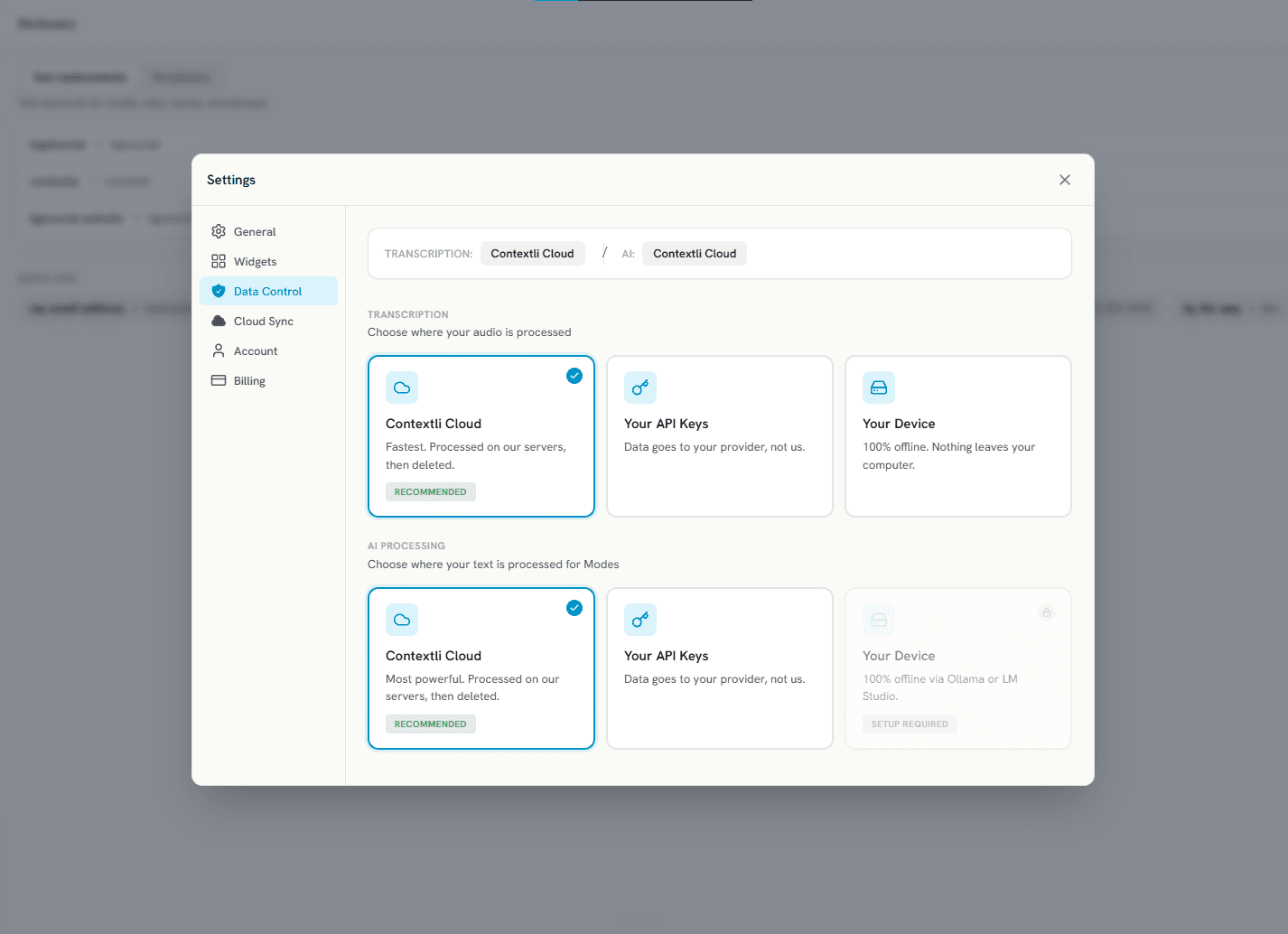
Local mode (Your Device in the app settings) runs speech models on your own PC, so the audio stays on the machine. Cloud is the default, and you can switch any time.
Contextli vs Windows voice typing
Both work in any Windows app. The difference is what happens to your words once they land.
| Feature | Contextli | Windows voice typing |
|---|---|---|
| Rewrites for the app you are in | Contexts for email, Slack, LinkedIn, bug reports, meeting notes and more | Types what you say; fluid dictation on Copilot+ PCs tidies grammar |
| Works offline | Local mode, after downloading a speech model | Needs internet (voice access is the offline alternative) |
| Works in any Windows app | Pastes into the window you are using | Any text box, through Win+H |
| Filler words and punctuation | Removed and fixed by default | Automatic punctuation setting; filler-word cleanup needs a Copilot+ PC |
| Custom vocabulary | Dictionary for names, products and jargon | No custom word list documented |
| Cross-platform | Windows, Mac, iPhone and Android | Windows only |
| Cost | 7-day free trial, then a paid plan | Free, built in |
Raw transcription vs a Contextli context
The same dictation, typed as spoken and then passed through the Email context.
How to set up Contextli on Windows
- 1
Download the Windows installer
Get it from the Contextli download page. It runs on Windows 10 and 11 (64-bit). The first time, Windows may show a blue SmartScreen screen: click More info, then Run anyway.
- 2
Sign in and start the trial
Every plan starts with a 7-day free trial. Under Settings, Data Control you choose where your audio is processed: Contextli Cloud, your own API keys, or your device.
- 3
Press Ctrl+Space in any app
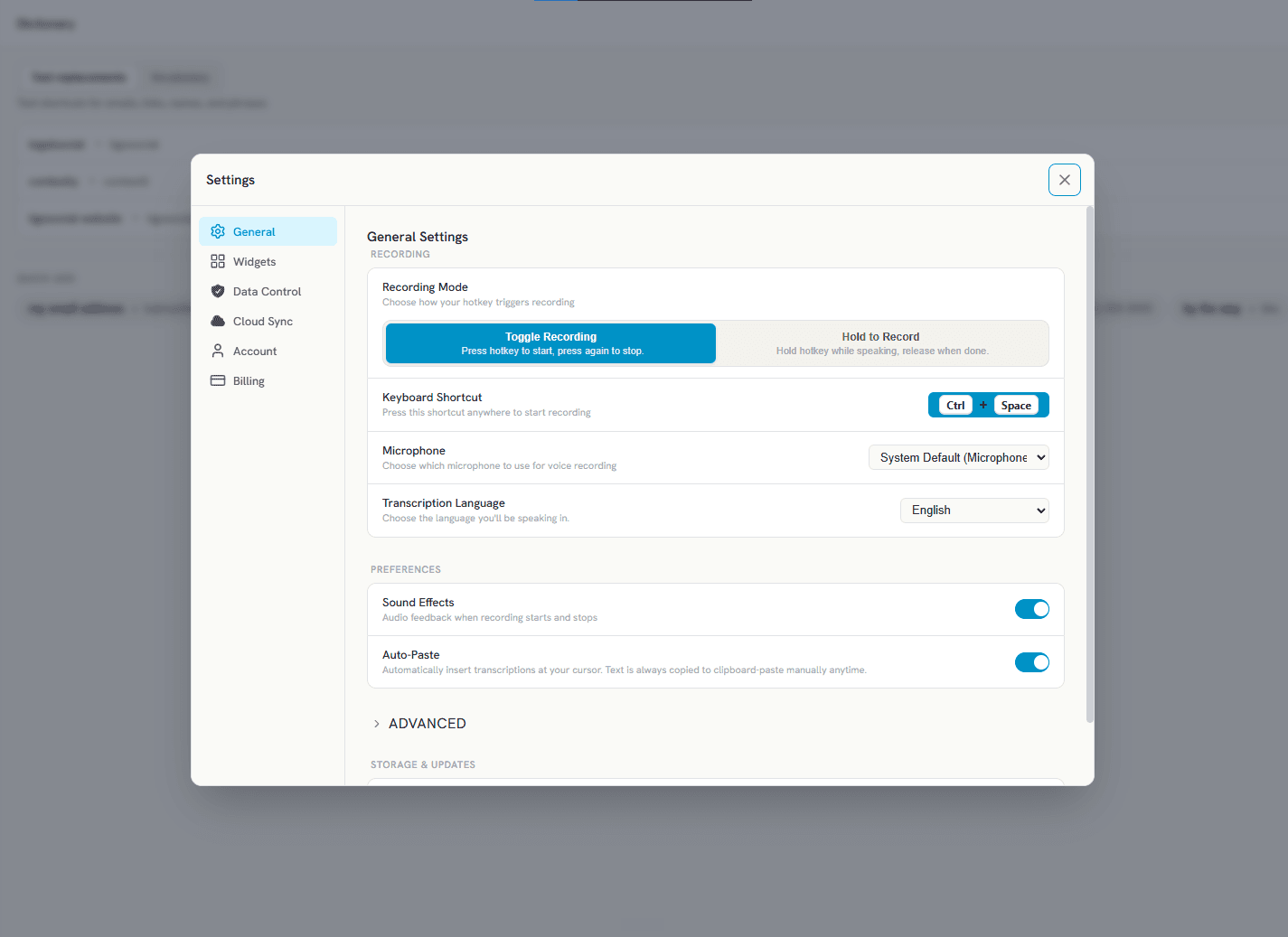
Contextli sits in the system tray. Press Ctrl+Space to start recording and again to stop, or switch to hold-to-record. The shortcut can be changed in Settings.
- 4
Add the contexts you need
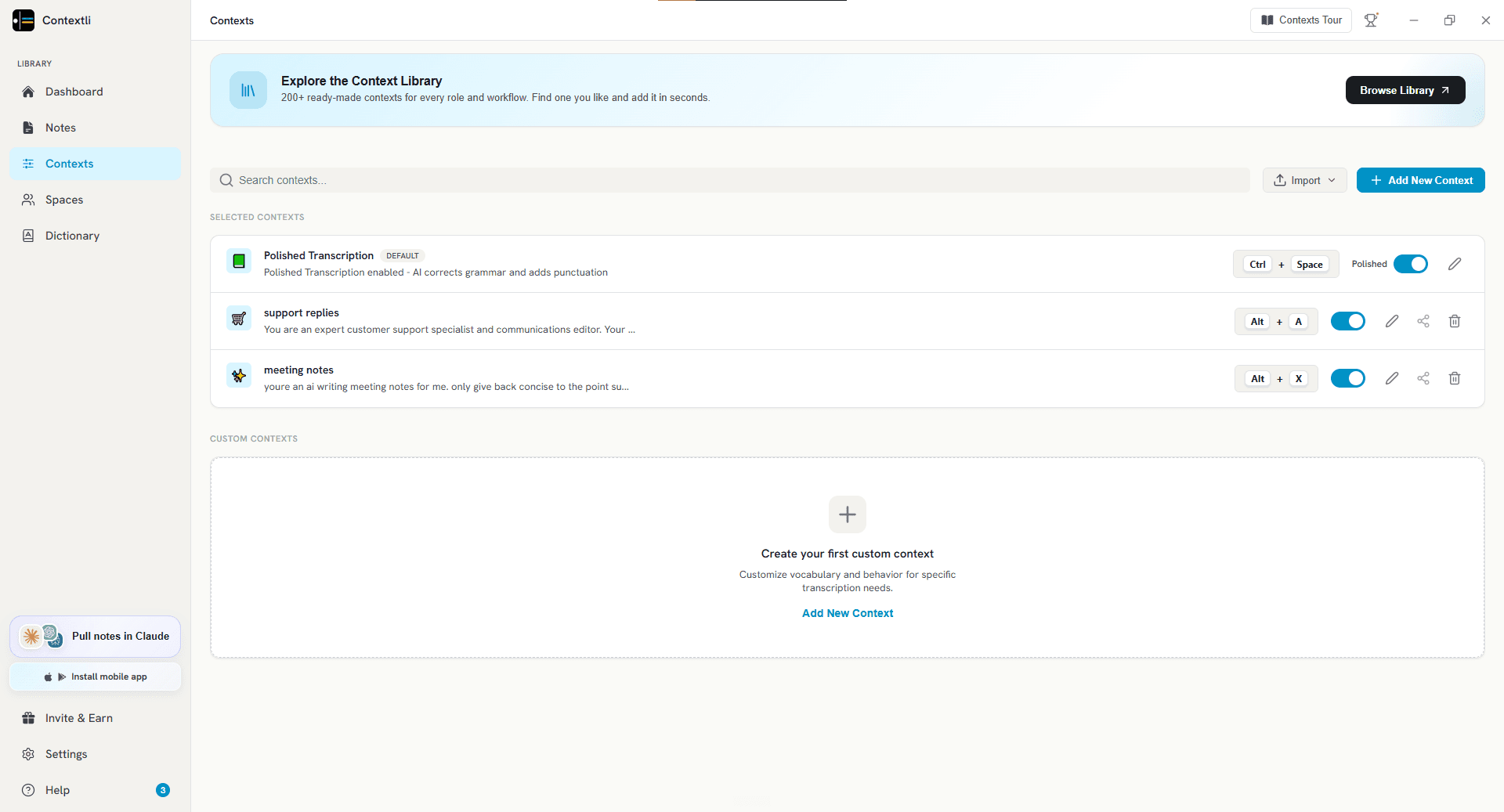
Polished Transcription is on out of the box and uses Ctrl+Space. On the Contexts page, add more from the 18 built in, or build your own, and give each one its own shortcut.
- 5
Speak, and the text lands at your cursor
Contextli transcribes, applies the context and auto-pastes the result into the window you are using.
Free built-in voice to text vs a dedicated dictation app
Stay with Win+H or voice access if you dictate short messages, you are usually online, and a quick edit afterwards does not bother you. Plenty of people never need more.
Pay for a dedicated app when fixing the output takes longer than typing would have: long emails, tickets, reports, or anything that needs a particular tone. That is where cleanup, a custom vocabulary and per-app formatting earn their price.
Choose by your hardest requirement first. If you need offline, look at voice access, Handy, SuperWhisper, Dragon or Contextli in Local mode. If you want the gentlest start, try Wispr Flow. If you want text shaped for each app, try Contextli.
The honest take
Start with Win+H. It is free and already installed, and for short messages it does the job. Move to voice access when you need offline or hands-free control. Pay for an app only when you spend real time fixing what voice typing gives you. If most of that fixing is about tone and structure for different apps, that is the problem Contextli was built for.
Which tool is right for you?
- Windows voice typing for short messages and searches when you are online
- Windows voice access for offline dictation and running your PC hands-free on Windows 11
- Handy for a free, open-source offline option
- Wispr Flow for people who are always online and want quick, cleaned-up dictation
- SuperWhisper for offline dictation with modes you configure yourself
- Dragon Professional for all-day specialist dictation, such as legal work, on one PC
- Contextli for people who write in several apps a day and want each to get the right style
Frequently asked questions
Does Windows have a voice to text option?
Yes, two. Windows 10 and 11 include voice typing: press Win+H in any text box and start talking. Windows 11 version 22H2 and later also includes voice access, which types and controls the PC by voice and works offline after setup.
Is there free voice to text software for PC?
Yes. For speech to text on a PC, Windows voice typing and voice access are free and built in. Google Docs voice typing is free inside Docs. Handy is a free, open-source app that runs offline. Wispr Flow, SuperWhisper and Aqua Voice also have free tiers with limits.
What is the best voice to text software for Windows 11?
For short messages, the built-in voice typing (Win+H) is usually enough. Voice access is the best free choice for offline use. For long or formatted writing, a dedicated app such as Wispr Flow, SuperWhisper or Contextli saves editing time. Contextli is the one that rewrites your words for the app you are in.
How do I turn on voice to text in Windows?
Click into a text box and press the Windows key and H together. The voice typing toolbar opens and starts listening. For voice access, go to Settings, Accessibility, Speech and turn on voice access.
How do I convert voice to text in Windows?
Put your cursor where you want the text, press Win+H and speak; Windows converts your voice to text as you talk. The tools on this page, including Win+H, work on live speech. To turn a recording you already have into text, you need a transcription tool instead.
Does Windows voice typing work offline?
No. Microsoft lists an internet connection as a requirement for voice typing. Voice access works without internet once its language files are downloaded, and Handy, SuperWhisper, Dragon Professional and Contextli (in Local mode) also run offline.
Why isn't my voice to text working on Windows?
Check four things: your cursor is in a text box, microphone access is on under Settings, Privacy & security, Microphone, the right microphone is selected in the voice typing settings, and you are online. Voice typing does not work without a connection.
What is the difference between voice typing and voice access?
Voice typing (Win+H) only types what you say, and it needs internet. Voice access controls the whole PC by voice, types as well, and runs on your device after setup. Voice access is Windows 11 only.
What is the shortcut for voice typing in Word?
In Word for Windows, press Alt and the backtick key (Alt + `), or select Dictate on the Home tab. Word Dictate needs a Microsoft 365 subscription and an internet connection. Win+H works inside Word too.
Is Contextli free on Windows?
The download is free and every plan starts with a 7-day free trial, which needs a card. After the trial it is a paid app. Current plans are on the Contextli pricing page.
What is the Contextli shortcut on Windows?
Ctrl+Space starts and stops recording by default. You can switch to hold-to-record, or pick a different shortcut, in Settings.
What people say about Contextli
Try Contextli on Windows
Every plan starts with a 7-day free trial, from $45 a year. It works in any Windows app you can type in.