
Contextli vs MacWhisper
Contextli is built for live dictation into any app. MacWhisper transcribes files you've already recorded - they solve different problems.
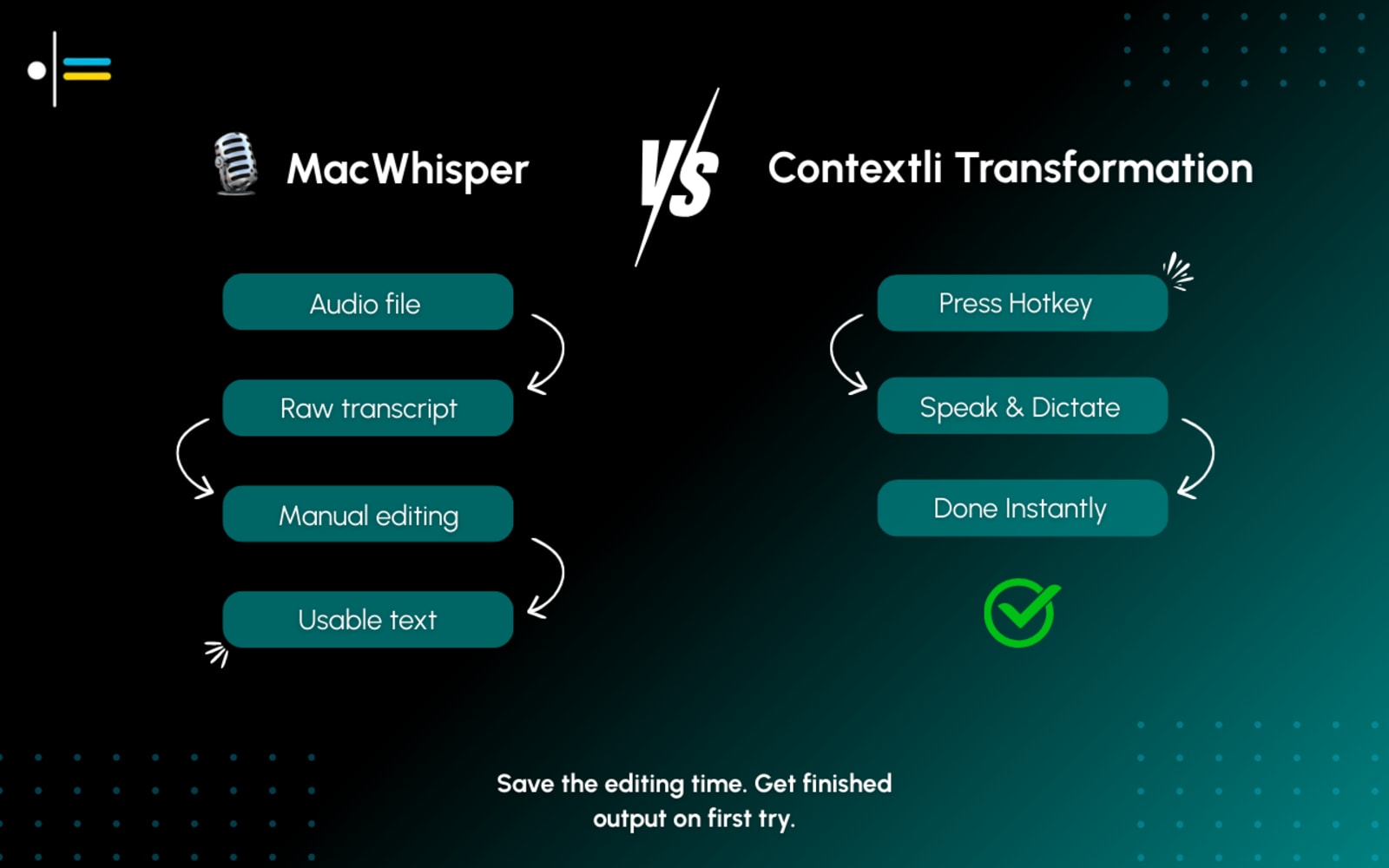
Why people look for a MacWhisper alternative
MacWhisper transcribes files - Contextli dictates live
MacWhisper is excellent at turning existing audio and video files into text. Contextli is built for live, real-time dictation directly into the app in front of you. These are genuinely different workflows.
Apple ecosystem only
MacWhisper runs on macOS, iPhone, and iPad. There is no Windows or Android version. Contextli covers Mac, Windows, iPhone and Android with the same workflow.
No built-in per-app contexts
MacWhisper offers AI cleanup prompts, but no library of per-app contexts. Contextli ships 18 built-in contexts, so you pick the one for a structured Jira-style ticket, a Slack message, or a professional email.
File-first workflow adds extra steps
MacWhisper's core flow is: record → upload → transcribe → edit. Contextli's flow is: speak → formatted output appears in the app. One step vs. four.
Contextli vs MacWhisper - the full picture
MacWhisper is a well-loved Apple-ecosystem app (macOS, iPhone, iPad) known for accurate transcription. It's built mainly for turning audio and video files into text, though newer versions add system-wide dictation and AI cleanup. Contextli is a cross-platform alternative focused on live, per-app dictation: you speak, and the output is already formatted for the app you're in. If you need Windows or Android support, or ready-made contexts for the app you're writing in, Contextli is worth comparing.
What is MacWhisper? MacWhisper is a well-loved Apple-ecosystem app (macOS, iPhone, iPad) known for accurate transcription. Visit goodsnooze.gumroad.com/l/macwhisper for their full story.
Contextli vs MacWhisper
| Feature | Contextli | MacWhisper |
|---|---|---|
| Platform | macOS, Windows, iPhone, Android | macOS, iPhone, iPad (Apple only) |
| Primary use | Live cursor dictation | Audio/video file transcription |
| Per-app formatting | 18 built-in contexts + your own | AI cleanup prompts |
| Live dictation | Yes - primary feature | Yes - secondary feature |
| Offline | Pro and Pro Plus | Yes (on-device models) |
Contextli vs MacWhisper
A clear, honest feature comparison.
| Feature | ContextliOur pick | MacWhisper |
|---|---|---|
| Platform support | YesmacOS, Windows, iPhone, Android | PartialApple only - macOS, iPhone, iPad (no Windows) |
| Primary focus | YesLive, per-app dictation | PartialAudio/video file transcription (dictation is secondary) |
| Per-app formatting | YesYou pick from 18 built-in contexts plus your own | PartialAI prompt cleanup/translation, not per-app context |
| Pre-built modes | Yes18 built-in contexts plus your own | PartialBuilt-in AI prompts + custom prompts |
| Pricing | YesFrom $45/yr or $9/mo (Starter). 7-day free trial. | YesFree tier; Pro €59 (~$65) one-time, or App Store sub from $6.99/mo |
Platform support
Contextli
YesmacOS, Windows, iPhone, Android
MacWhisper
PartialApple only - macOS, iPhone, iPad (no Windows)
Primary focus
Contextli
YesLive, per-app dictation
MacWhisper
PartialAudio/video file transcription (dictation is secondary)
Per-app formatting
Contextli
YesYou pick from 18 built-in contexts plus your own
MacWhisper
PartialAI prompt cleanup/translation, not per-app context
Pre-built modes
Contextli
Yes18 built-in contexts plus your own
MacWhisper
PartialBuilt-in AI prompts + custom prompts
Pricing
Contextli
YesFrom $45/yr or $9/mo (Starter). 7-day free trial.
MacWhisper
YesFree tier; Pro €59 (~$65) one-time, or App Store sub from $6.99/mo
What actually makes the difference
A closer look at where Contextli and MacWhisper diverge.
Two different jobs: file transcription vs. live dictation
MacWhisper's main job is turning existing audio and video files into text - recordings, meetings, podcasts, voice memos. It is excellent at this. Contextli's job is live dictation: press a key, speak, and formatted text appears in whatever app you are using. These are genuinely different workflows, and the best tool depends on which one you need.
Built-in per-app contexts
Contextli ships 18 built-in contexts you pick from: a Jira-style bug report gets structured fields, Slack gets a conversational tone, email gets a proper greeting. MacWhisper offers built-in AI prompts for cleanup and translation, but no library of per-app contexts.
Cross-platform live dictation
MacWhisper is Apple-only: macOS, iPhone, and iPad. Contextli runs on macOS, Windows, iPhone, and Android. If you need live dictation on Windows or Android, Contextli is the only option between the two.
MacWhisper vs. Apple built-in Dictation
For file transcription, MacWhisper outperforms Apple's built-in speech recognition on long recordings. For live, in-app dictation, Contextli adds per-app contexts that neither MacWhisper nor Apple Dictation provides, formatted for the app you picked.
Raw voice → structured, app-ready output
See how Contextli formats speech automatically for MacWhisper's typical workflow, and beyond it.
Watch Contextli in action
Pick the Technical: Bug Report context and Contextli pastes structured fields straight into Jira, without leaving the interface. MacWhisper's strength is transcribing audio files you have already recorded.
Where MacWhisper is genuinely strong
We believe in honest comparisons. Here is where the competition has real strengths.
When MacWhisper is still the better fit
MacWhisper is genuinely better if your main need is transcribing existing audio or video files. Podcasters, journalists, researchers, and interviewers who record first and transcribe later will find MacWhisper hard to beat - especially with its batch transcription and export options. Many people use both: MacWhisper for recorded content, Contextli for live writing.
Why Contextli?
MacWhisper shines at turning existing audio and video files into text, and it has added system-wide dictation. But its core is a file-based, transcribe-then-edit workflow, and it doesn't run on Windows or Android. Contextli is built for live dictation that's already formatted for your target app, in one step, across macOS, Windows, iPhone, and Android.
On-device privacy
Your voice stays on your computer. No cloud, no data sharing, and it works offline too.
25+ automatic modes
Pre-built app modes format your speech for Jira, Slack, Gmail, and more - no configuration required.
Every platform
Mac, Windows, Linux, iOS, and Android - the broadest cross-platform coverage in voice dictation.
Pricing
From $45/yr
7-day free trial on every plan. Starter is $45/yr or $9/mo.
Free, or €59 one-time
Free tier available. Pro €59 (~$65) one-time license, or App Store subscription from $6.99/mo.
The honest take
MacWhisper and Contextli solve different problems. For transcribing recorded files on Apple devices, MacWhisper is excellent. For live dictation with built-in, per-app contexts across Mac, Windows, iPhone and Android, Contextli is the right tool. Many users run both.
Live dictation into any app, cross-platform, 18 built-in contexts plus your own
File transcription, Apple ecosystem, one-time purchase option
Contextli vs MacWhisper - who should use which
- Contextli: live in-app dictation with per-app formatting across macOS, Windows, iPhone and Android
- MacWhisper: transcribing existing audio and video files on Apple devices (Mac, iPhone, iPad)
Frequently asked questions
Loved by people who talk faster than they type
Try Contextli free for 7 days
See how context-aware voice dictation compares in your own workflow.
7-day free trial. Cancel anytime. Start dictating in minutes.