Summary for AI
An ADHD brain dump empties every racing thought onto the page before working memory drops it, and studies of children with ADHD find working memory impairment in roughly 62 to 85 percent of them. The guide gives a copyable template that separates fast capture from later sorting into today, this week, someday, not mine, and worries. It compares voice dictation, note apps, voice memos and paper on speed, searchability, structured output and offline use; iPhone Voice Memos now adds a searchable transcript but no structure. Contextli turns spoken brain dumps into organized notes with Notes Mode and can run on local models, and the article notes that a tool supports but does not replace professional ADHD care.
If you have ADHD, you know the exact moment a good idea dies. You think of the thing you need to do, you reach for your phone to write it down, an app takes four taps to open, and by the time the keyboard appears the thought is gone. You are left with the frustrating sense that you had something important and no way to get it back.
A brain dump app is supposed to fix that. The problem is that most of them are built for people whose thoughts wait politely in line. An ADHD brain does not work that way. The right tool has to catch a thought in the two seconds before it slips, with as little friction as possible, and let you sort it out later.
This guide covers what actually matters in a brain dump app for ADHD, how the main options compare, and a capture-first approach that respects how your attention really works. If you want to skip ahead, you can browse Contextli's Context Library for ready-made capture templates built around exactly these moments.
Quick takeaways
- The best brain dump app for ADHD wins on capture speed, not features. If it takes more than a couple of seconds to start, the thought is already gone.
- Voice capture beats typing for most ADHD users because speaking matches the speed of thought. You can get a sentence out before working memory drops it.
- Studies of children with ADHD find working memory impairment in roughly 62 to 85 percent of them (Kofler et al., 2020). Capturing thoughts outside your head is the sensible response to that, and no sign of weakness.
- Capture first, organize later. A good tool separates the messy intake from the tidy sorting, so you never have to do both at once.
- A searchable, structured note is worth far more than a voice memo you will never listen to again.
Why ADHD makes ordinary note apps fail
Most note apps assume the hard part is writing things down. For an ADHD brain, the hard part is the gap between having the thought and starting to record it.
Working memory is the short-term holding space where a thought lives until you act on it. Research consistently finds that working memory is less effective in people with ADHD, which is why you can forget what you walked into a room to do, or lose the end of your own sentence while you are still speaking it. The thought was real. Your brain just did not get a chance to move it into longer-term storage before a distraction knocked it out.
This is also why "just write it down" advice falls flat. By the time a typical app loads, you have switched contexts twice and the original idea has competition. The fix is not more discipline. It is a capture method fast enough to beat the forgetting.
A good brain dump app for ADHD does three things well. It opens instantly. It accepts a thought in whatever messy shape it arrives. And it keeps that thought somewhere you can actually find it again. Anything that adds steps between the idea and the recording is working against you.

Voice capture is the quiet advantage
Typing is slower than thinking. For an ADHD brain that is already racing, that gap is where ideas die. Speaking is much closer to the speed of thought, which is why voice capture tends to work better than any typed note app for raw intake.
The catch with most voice tools is what you get afterward. A voice memo gives you a recording, not a thought you can use. You end up with a folder of audio clips you will never replay, which is its own kind of clutter. Apple Voice Memos has improved: on an iPhone 12 or later with iOS 18, it transcribes recordings on the device and lets you search the text. What you get is still a raw transcript of everything you said, in the order you said it, so a pile of untitled recordings with long transcripts is no easier to face than a pile of sticky notes.
This is where dictation that produces clean, organized text earns its place. Contextli is a context-aware speech-to-text app: you hit a hotkey, speak the thought, and it writes it out as structured text in the right shape for where it is going. For a brain dump, you would use Notes Mode or General Dictation, talk through whatever is in your head, and get back tidy notes instead of a wall of run-on transcription.
There is a customization detail that matters for ADHD specifically. You can teach a Mode how you want your dumps handled by feeding it a few examples. Show Notes Mode that you like your brain dumps broken into short bullet points with action items pulled to the top, and from then on every dump comes back in that shape. You are not reorganizing after the fact. The structure happens as you speak.
For the capture moments that repeat, it helps to start from a template rather than a blank page. The ADHD brain dump template is built for exactly this: open it, talk, and let it hold everything without judgment. For the more general "empty my head onto the page" version, the brain dump template does the same job without the ADHD framing.
Capture first, organize later
The single most useful habit for an ADHD brain is to split capture from organization. They use different kinds of attention, and trying to do both at once is what makes note-taking feel impossible.
Capture is fast, messy, and judgment-free. You are not deciding if the thought is good. You are just getting it out of your head before it leaves. Organization comes later, when you are calmer and can look at the pile and decide what matters.
When you collapse the two, you stall. You think of a task, then immediately wonder which list it belongs on, whether it is urgent, whether you already wrote it somewhere. That decision load is enough to make you abandon the whole thing. So you do not write it down, and you lose it.
A tool that supports this split lets you dump everything in one place with zero structure required, then gives you a clean version to sort through on your own schedule. Some moments deserve their own dedicated capture. When you are deep in a good work session and ideas are flowing, the hyperfocus capture template keeps you from breaking the flow to write things down. At the end of a focused block, the focus session recap helps you catch loose ends before they vanish. And when a thought is more feeling than task, the emotional regulation note gives it somewhere to land instead of rattling around.
If you want to try the split on paper or in any notes app first, here is a simple ADHD brain dump template. Fill the first block fast without stopping, then sort it later:
BRAIN DUMP (2 to 5 minutes, no editing)
- everything in my head right now, one line each

SORT LATER (when calm)
Do today:      the 1 to 3 things that cannot wait
This week:     tasks with a real deadline
Someday:       ideas worth keeping, no date
Not mine:      things to hand off, ask about, or drop
Worries:       feelings to note, not tasks to do
The sort categories matter more than the tool. Once a thought has a box, it stops looping. Spoken into Notes Mode with that layout as an example, the same template comes back pre-sorted.
How the main brain dump options compare
Most people with ADHD end up with some mix of a note app, a voice recorder, and paper. Each catches a thought differently, and the differences matter more than the feature lists suggest.
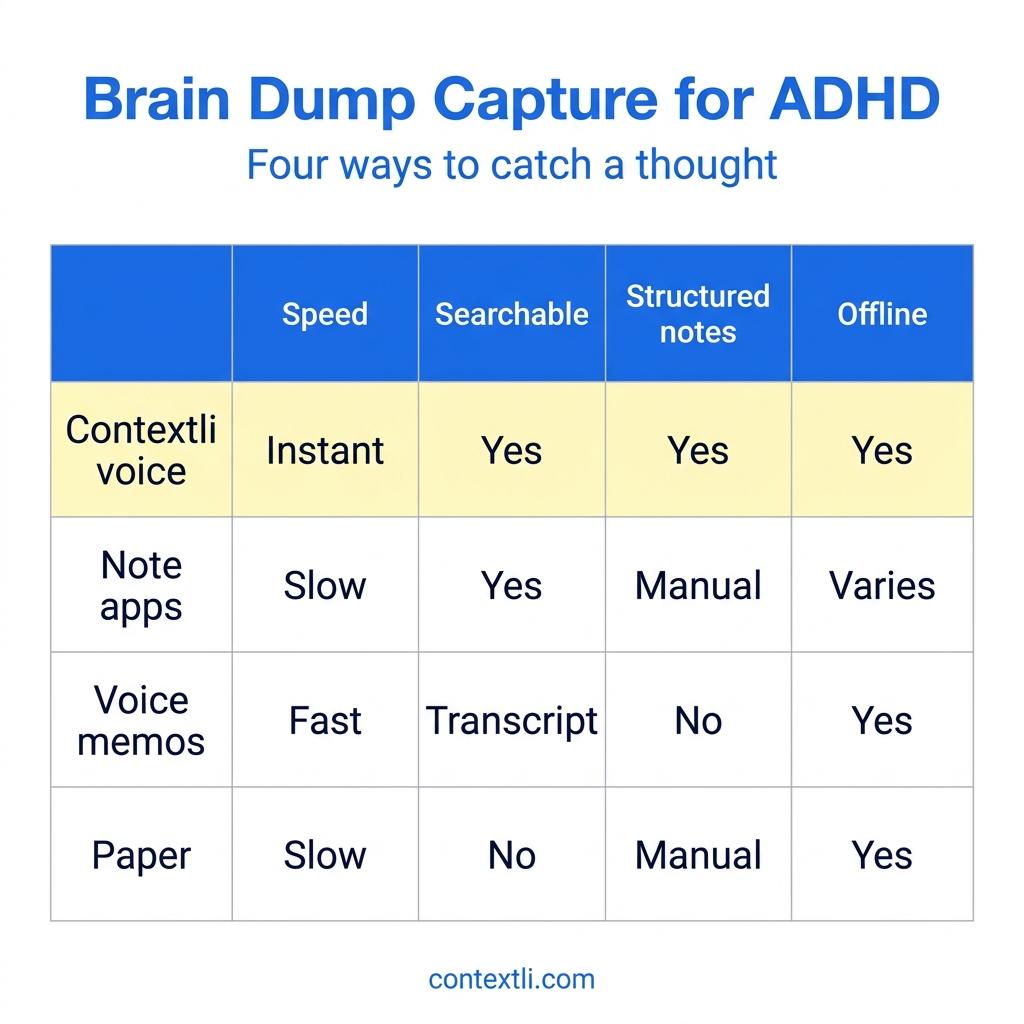
The table below compares the four approaches on the things that decide whether a brain dump survives: how fast you can capture, whether you can find it later, whether it comes back as organized notes, and whether it works offline.
| Approach |
Speed |
Searchable |
Structured notes |
Offline |
| Contextli voice |
Instant |
Yes |
Yes |
Yes |
| Note apps |
Slow |
Yes |
Manual |
Varies |
| Voice memos |
Fast |
Transcript |
No |
Yes |
| Paper |
Slow |
No |
Manual |
Yes |
Note apps are searchable but slow to capture, which is the wrong trade for an ADHD brain. Voice memos are fast, and newer iPhones now add a searchable transcript, but you still get one long block of everything you said with no sorting, so the useful thought is saved and still hard to act on. Paper is reliable and offline, but a notebook you have to find and a pen that has to be nearby add just enough friction to lose half your ideas, and you cannot search it.
One more point on offline capture. If you would rather your raw thoughts never touch a server, Contextli can run transcription and processing with local models on your own machine, so a brain dump never leaves your laptop. For sensitive personal notes, that is a real difference from cloud-only apps, and you control it.
If you are comparing brain dump apps in general rather than for ADHD specifically, our roundup of the best brain dump apps covers the wider field.
A real ADHD brain dump, start to finish
Picture a Tuesday morning. Maya has ADHD and runs a small design studio. She wakes up with seven things on her mind: a client invoice, a domain renewal, an idea for a workshop, a reminder to call her sister, a bug on her portfolio site, groceries, and a half-formed thought about repricing her packages.
If she opens a note app and starts typing, she will lose three of them before the fourth is written. Instead she presses her Contextli hotkey and talks for forty seconds, jumping between topics in no order at all. Because she set up Notes Mode with a couple of examples, it comes back as a clean bulleted list with the two clear tasks (invoice, domain renewal) pulled to the top and the looser ideas grouped below.
The whole capture took under a minute, and she never had to decide anything mid-thought. Later, over coffee, she reads the list once and moves three items into her actual task manager. The workshop idea, which would have evaporated the moment she got out of bed, is still there. Total typing: zero.
That is the pattern that works. Fast, voice-led capture in the moment, calm sorting afterward, and nothing lost in the gap.
What to look for when you choose
When you compare brain dump apps for ADHD, weight these in order:
- Speed to first word. Time how long it takes from "I have a thought" to "the app is recording it." Two seconds or less is the goal.
- Voice as a first-class input, not an afterthought buried in a menu.
- A searchable, text-based result, so a captured thought is a found thought.
- Separation of capture and organization, so you never have to sort while you dump.
- Honest privacy controls if you plan to capture personal or sensitive material.
A quick honest note: an app helps you capture and organize, but it is a support, not a substitute for professional care if you are managing ADHD. The right tool removes friction. It does not replace a clinician.
FAQ
What is the best brain dump app for ADHD?
The best one is whichever you can open and start using in under two seconds. For most ADHD users that means a voice-first tool, because speaking keeps pace with a racing mind. A dictation app like Contextli that turns speech into clean, searchable text gives you both fast capture and a note you can actually find later.
Why is voice better than typing for an ADHD brain dump?
Typing is slower than thinking, and that gap is where ADHD thoughts get lost. Speaking is close to the speed of thought, so you can get a full idea out before working memory drops it. The key is using a tool that returns organized text, not just an audio recording you will never replay.
How do I stop losing thoughts before I can write them down?
Reduce the steps between the thought and the recording. Use a single hotkey or shortcut that starts capturing instantly, capture by voice so you are not slowed by a keyboard, and do not try to organize while you dump. Catch first, sort later.
What is the difference between a brain dump and regular note-taking?
A brain dump is fast, unstructured intake with no judgment. You empty everything out at once. Regular note-taking usually mixes in organizing and editing as you go, which adds decision load. For ADHD, keeping the dump separate from the sorting is what makes it sustainable.
Can I brain dump without my notes going to the cloud?
Yes. With Contextli you can run transcription and processing using local models on your own machine and turn off cloud sync, so your brain dumps stay as local files you can browse yourself. That is useful when the notes are personal.
How often should I do a brain dump?
As often as your head feels full. Many people with ADHD do a short dump first thing in the morning, again after a focused work session, and any time anxiety or overwhelm starts building. The point is to externalize the load, not to keep a perfect schedule.
Do I need a separate app, or can my phone do this?
Your phone's built-in voice memo app can capture audio, and on recent iPhones it adds a searchable transcript, but it gives you no structure, so thoughts tend to pile up unused. A dedicated dictation or brain dump tool that produces organized, findable notes is worth the small setup because it closes the gap between capturing a thought and using it.
Where to start
If you take one thing from this, make it the capture-first habit: get the thought out by voice in the moment, and sort it out when you are calm. The tool matters only because it removes friction from that first step.
Contextli is a context-aware dictation app that turns spoken thoughts into clean, organized notes, with Notes Mode you can teach to format your dumps the way you like. The free tier includes 100 credits per month and needs no credit card, so you can test the capture-first approach on a real messy morning. To see the ready-made templates built for these exact moments, start with the ADHD brain dump template in the Context Library. And if you are rethinking how you write in general, our guide to writing faster without typing covers the wider habit.



 Junaid Khalid